
USFans Spreadsheet Links: Keep the Right Item Attached to Your Choice
USFans spreadsheet links are useful when they take you back to the item you meant to compare. A successful page load is only the first check. Before you rely on a saved row, confirm the product, selected option and number of pieces on the page that actually opens.
Start with the USFans spreadsheet homepage if you are still choosing a category. Once you have a candidate, use the checks below to carry that choice forward without silently replacing it with another size, variant or product.
Keep the original reference and the destination together
Save the original product address alongside a short description of the choice you made. Include the size, colour and quantity where relevant. If a later link opens a different address, compare the resulting page with that description before assuming the two represent the same selection.
Do not remove unfamiliar parts of a saved address just to make it shorter. Some addresses contain information that changes the destination or option. At the same time, do not share a private account, checkout or order-management link as though it were a public product reference. Use a public listing for sharing, and keep private order records separately.
An item reference and an order reference also do different jobs. The first helps locate a candidate; the second identifies an actual transaction. Saving one does not create the other.
Check three layers after opening a row
1. Are you on a product page?
A category, search result or homepage may contain a similar picture without identifying the item you saved. Find the individual listing before comparing its options. If you cannot recover it, keep any alternative as a new candidate rather than silently replacing the original entry.
2. Is it the intended product?
Compare the listing reference and visible details. A similar title or repeated photograph is not enough on its own. Look for differences in included pieces, design details or the listing's option structure that would change your decision.
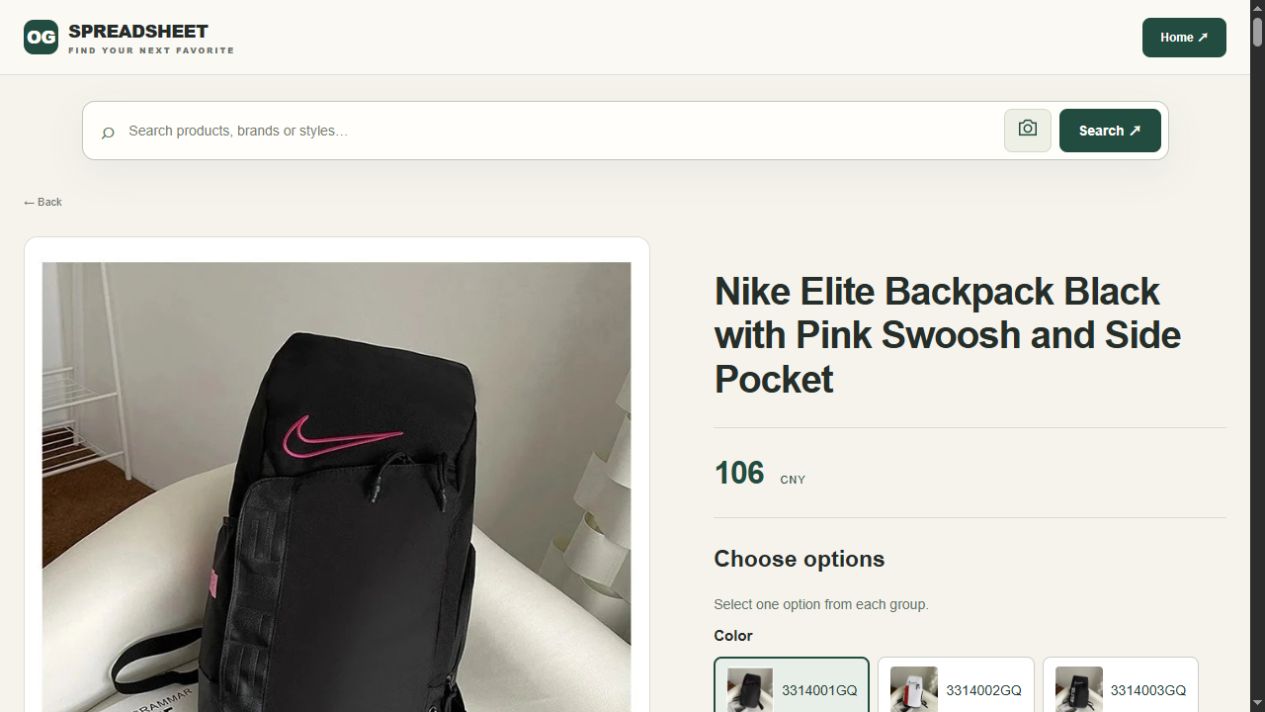
For a concrete comparison, open the black backpack listing on USFans. Its title identifies a pink logo detail and a side pocket. Keep those identifying details with the public reference, then check the selected variant and dimensions. If you need space for a laptop, ask about the relevant compartment rather than inferring its size from the exterior picture.
3. Is your intended option still selected?
Confirm the size, colour, unit or bundle after navigation. If a link opens the product but leaves you at a default option, select the intended one again and examine the resulting amount and description. Do not carry measurements from one variant into another merely because the gallery looks similar.
The size guide helps with measurement comparisons. The main ordering guide covers the later transition from a candidate to an actual purchase request.
When a saved link does not work
Use the visible result to decide the next step. A blank screen, an unavailable-item message and a sign-in request are different situations; none should be treated as a successful product match.
| What happens | What to try next | What not to conclude |
|---|---|---|
| A general page opens | Compare your saved description with individual listings | That the first similar picture is the original |
| The product loads but your variant is missing | Inspect the available options and keep any alternative separate | That another size or set is equivalent |
| The page stays blank | Try opening the same address directly and note whether other pages work | That a product has definitely been removed |
| A sign-in page appears | Check the destination before providing credentials | That every login prompt belongs to the service you intended |
| An unavailable message appears | Save the message and item reference, then consider a new candidate | That a replacement link is automatically the same listing |
Do not keep submitting an order or payment while trying to solve a browsing problem. First determine whether an order already exists in your own account. For a payment uncertainty, retain the transaction reference privately and follow the appropriate support process rather than paying again simply because the product page failed to reload.
For account-related checks, read using spreadsheet links safely. For an older saved entry, the archive guide explains how to separate recovering a reference from confirming its present details.
A changed link can change the purchase
Imagine a hypothetical saved row for a black backpack. A replacement link opens a similar bag, but its selected option includes an accessory and has a different size description. Even if the picture seems familiar, the purchase is no longer described by the old row.
Create a separate entry for the replacement. Compare the actual included pieces and measurements, then decide which candidate meets your needs. Do not attach an old inspection image to the replacement as though it showed that new selection. The QC photo guide explains why the pictured item and the relevant order must stay connected.
Recheck at the point the replacement changes your choice: contents, dimensions, variant or amount. A working destination is the beginning of that comparison, not its conclusion.
Keep a recovery note without merging two products
A useful link-recovery note shows what you found, what remains uncertain and whether your original choice survived the change. For the hypothetical backpack replacement above, keep the earlier entry visible while checking the new candidate. This is a comparison example, not a report that either listing has changed.
| Field | Keep this distinction clear |
|---|---|
| Earlier reference | The public address and option you originally intended to compare |
| Destination now opened | The individual product page, not just the search that led to it |
| Pieces and variant | The selected bag and any included accessory, colour or size choice |
| Unresolved detail | The compartment or opening measurement needed for your own use |
| Decision | Recovered original, separate alternative, or still unresolved |
If the destination offers a bag with an accessory but the old note concerns the bag alone, label it as an alternative until the contents are clear. A familiar photograph does not close that question. Likewise, matching an outside dimension does not establish the usable compartment size needed for a laptop.
Once you choose a different candidate, give it its own measurements and image context. Preserve the earlier entry only to explain the change. Before a purchase request, follow the ordering guide and check what the service actually recognises; your saved recovery note does not update an existing order.
Opening, searching and converting are different actions
Opening a product link shows a destination. Searching shows candidates. A conversion would need to preserve the intended source item in a usable destination format. These are not interchangeable results.
The shopping links in these articles open OG pages. They do not log into USFans, copy your basket, place an order or guarantee a source item can be purchased through USFans. If you use another interface to submit a product reference, check what that interface actually returns before continuing.
An image match requires the same caution. Visual similarity can help you discover a candidate, but it does not establish the same seller, variant, material or included pieces. Confirm the listing details even when a photograph looks identical.
Recheck the row before you act
Once a candidate passes your checks, keep a compact note: public product reference, intended option, quantity and the date you examined it. Revisit the choice before submitting a purchase request. If the listing changes, update your comparison rather than treating the earlier note as a guarantee.
You do not need an elaborate scoring system to do this. A clear note explaining why the candidate fits your purpose is more useful than a collection of unexplained links. The best spreadsheet guide shows how to judge whether a collection supports that kind of comparison.
Can I reuse a link from someone else's haul?
Use it to locate a candidate, then check your own option and intended use. Another person's received item or parcel does not select your variant or establish your delivery cost.
Does a working link prove the product is genuine or good quality?
No. It establishes that you reached a page. Authenticity, condition, fit and functional properties require relevant information beyond the fact that a destination loads.
What should I send when asking about a broken row?
Share the public listing address, the visible problem and the option you were trying to identify. Remove account details, addresses, payment information and private order identifiers from anything posted publicly.
Back to the USFans spreadsheet homepage · Back to top
A historical amount is not a current quote
In a hypothetical archive, a row might record an item at 22 in a stated currency during a past comparison. To interpret a real historical amount, you need its observation date and price basis. Keep it separate from a quote for today's product, quantity or parcel.
If you want to compare it with a current candidate, open both destinations and record the differences. The product may have changed, the selected option may be unavailable, or the amount may now cover a different unit. Keep the historical and current values in separate columns rather than overwriting the old observation.
The best spreadsheet guide explains how to judge whether a current collection answers your decision. The shipping calculator handles the parcel inputs that an archived product amount cannot supply.
Recover a destination carefully
Open the saved address and classify what happens:
| Result | How to use the archive |
|---|---|
| The same individual product opens | Recheck option, amount and current details |
| A category or search page opens | Search for the item, but record the new destination separately |
| A similar product opens | Treat it as a new candidate, not a replacement |
| The page is unavailable | Retain the historical row and note that the current destination could not be confirmed |
Do not infer that a similar photograph means the archived item is still listed. If the option is missing, do not attach the old size or QC image to another variant.
To practise that comparison with a separate candidate, open these wide-leg jeans on USFans and record their selected size and finish in a new row. Leave the original archived reference intact; do not transfer its old price or measurements to the new entry.
Make the fresh candidate's identity explicit
The dated 1 October 2026 jeans view shows Blue / M at 70.00 CNY. Its on-body catalogue picture helps recognise the design, but it supplies neither the model's measurements nor the old row's garment dimensions. Preserve those limits when building a new entry beside the historical one; a size letter and a familiar image are not enough to merge their histories.