
USFans Payment Methods: Check the Purchase Before You Confirm
Before choosing a USFans payment method, identify what you are paying for. A product purchase and a later parcel charge are different transactions. Check the item or parcel reference and the amount shown at that particular step rather than relying on a total saved earlier.
Start with the purchase summary
Compare the selected item, option and quantity with your intention. Check the currency beside the amount, not just the digits. If a coupon is involved, identify the deduction and the part of the total it affects before treating the offer as applied.
Use the coupon guide when the reduction is unclear. Do not proceed solely because a button is available while an essential part of the purchase summary remains unexplained.
For a product-selection example, inspect a T-shirt product page on USFans Spreadsheet, save the intended colour and size, and compare that selection with the purchase summary before paying.
Does USFans accept PayPal or Klarna?
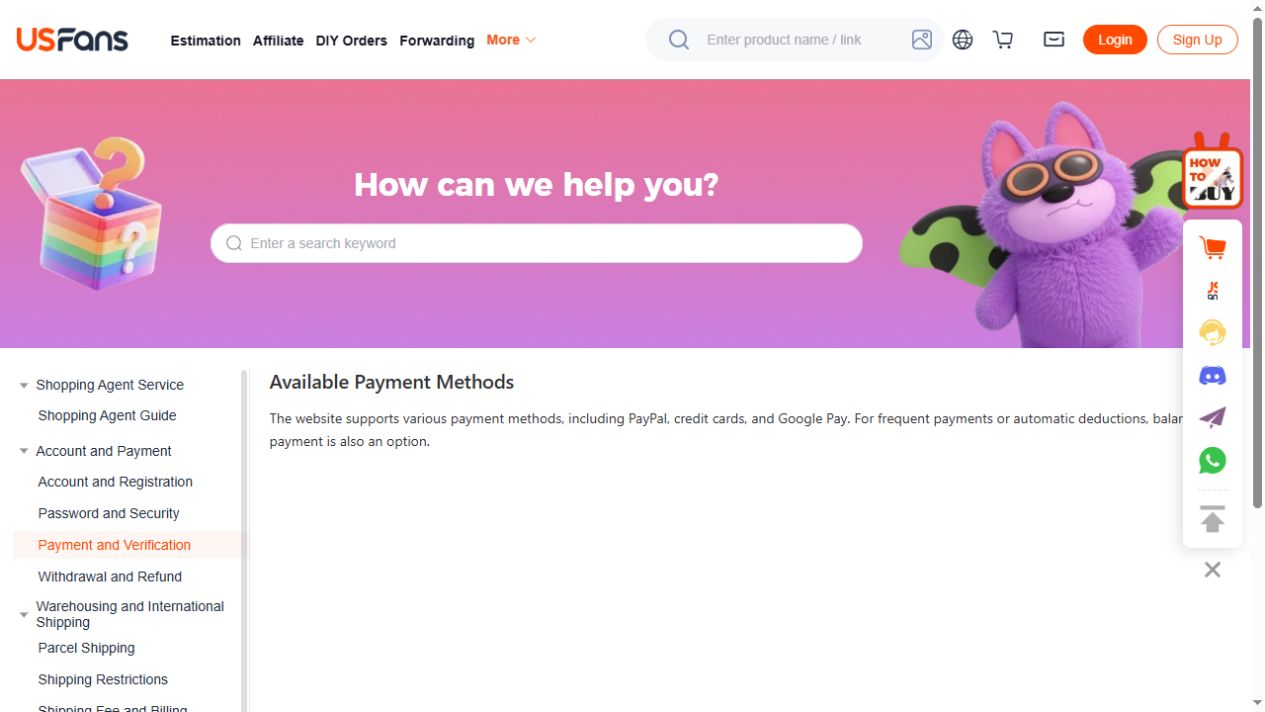
USFans' payment-method page checked on 30 September 2026 listed PayPal, credit cards, Google Pay and account balance. Klarna was not in that observed list. Use it as a starting point, then check the methods actually offered for the account and transaction in front of you; a missing entry in one help list is not proof of availability or unavailability in every checkout.
Before selecting a method, read its displayed charges and conditions and compare the currency and final amount. If the method you intend to use is absent, ask support about that purchase step rather than following payment instructions from an unknown social account.
Keep the destination clear
Before entering payment information, establish that the page is the expected destination for your purchase. If a handoff opens another page, inspect where you arrived and what action it requests. A message from an unknown social account is not a reason to send a payment elsewhere.
Never share a password, verification code or full payment credentials in a community post. A legitimate question about the purchase amount can be discussed without exposing access to the account.
Submit once, then read the result
After submitting, distinguish the response from the resulting order record. A payment screen closing is not itself a purchase confirmation. If the result is ambiguous, record the time and visible message and inspect the relevant transaction and order information.
Do not repeat the action merely to obtain a clearer screen. The payment-failed guide explains how to organise the first attempt before deciding what to do next.
Keep a private reference for follow-up
Retain the information needed to identify the transaction, with sensitive details kept private. If the amount or state differs between records, ask the relevant service to explain that difference using the original reference.
Include the affected item, current status and the action you want clarified. Once the payment question is resolved, the order-status guide covers the separate question of what happens to the item or parcel. Payment confirmation does not establish delivery or product condition.
Write down the attempt you are investigating
Keep the approximate time, displayed currency and amount, intended purchase and exact message. If you already tried more than once, record each attempt separately instead of treating them as one event.
Identify whether the attempt concerned goods, a parcel or another stated charge. Use its own reference. A later order for the same product is not necessarily the record belonging to the attempt you are investigating.
Compare the records without renaming their states
Read the wording shown by the payment service and the shopping account. Do not turn every unfamiliar state into “failed,” “refunded” or “paid.” If the wording is unclear, ask the service responsible for that record what it means.
If one record shows an amount and another does not show the expected order, preserve both observations. USFans' payment-help instruction checked on 30 September 2026 says to contact online support with the relevant details when payment succeeded at the provider but the platform reports failure. Identify the original attempt before retrying, so support can reconcile it rather than investigate a second charge.
The order-status guide helps identify the purchase record. The payment guide covers checking the transaction before submission.